Inside Bitcoin
Opening the selected file…
Inside Bitcoin
Opening the selected file…
The code behind the network, with room to understand it.
Release published 2026-10-28 · Snapshot fetched 2026-11-01. Latest stable release at fetch time; development branches and Git history are excluded. Only the selected code window and visible folders load here.
1# Guix Installation and Setup3This only needs to be done once per machine. If you have already completed the4installation and setup, please proceed to [perform a build](./README.md).6Otherwise, you may choose from one of the following options to install Guix:81. Using the official **shell installer script** [⤓ skip to section][install-script]9- Maintained by Guix developers10- Easiest (automatically performs *most* setup)11- Works on nearly all Linux distributions12- Only installs latest release13- Binary installation only, requires high level of trust14- Note: The script needs to be run as root, so it should be inspected before it's run152. Using the official **binary tarball** [⤓ skip to section][install-bin-tarball]16- Maintained by Guix developers17- Normal difficulty (full manual setup required)18- Works on nearly all Linux distributions19- Installs any release20- Binary installation only, requires high level of trust213. Using fanquake's **container image** [↗︎ external instructions][install-fanquake-container]22- Maintained by fanquake23- Easy (automatically performs *some* setup)24- Works wherever container images work (Docker/Podman)25- Installs any release26- Binary installation only, requires high level of trust274. Using a **distribution-maintained package** [⤓ skip to section][install-distro-pkg]28- Maintained by distribution's Guix package maintainer29- Normal difficulty (manual setup required)30- Works only on distributions with Guix packaged, see: https://repology.org/project/guix/versions31- Installs a release decided on by package maintainer32- Source or binary installation depending on the distribution335. Building **from source** [⤓ skip to section][install-source]34- Maintained by you35- Hard, but rewarding36- Can be made to work on most Linux distributions37- Installs any commit (more granular)38- Source installation, requires lower level of trust40## Options 1 and 2: Using the official shell installer script or binary tarball42The installation instructions for both the official shell installer script and43the binary tarballs can be found in the GNU Guix Manual's [Binary Installation44section](https://guix.gnu.org/manual/en/html_node/Binary-Installation.html).46Note that running through the binary tarball installation steps is largely47equivalent to manually performing what the shell installer script does.49Note that at the time of writing (July 5th, 2021), the shell installer script50automatically creates an `/etc/profile.d` entry which the binary tarball51installation instructions do not ask you to create. However, you will likely52need this entry for better desktop integration. Please see [this53section](#add-an-etcprofiled-entry) for instructions on how to add a54`/etc/profile.d/guix.sh` entry.56Regardless of which installation option you chose, the changes to57`/etc/profile.d` will not take effect until the next shell or desktop session,58so you should log out and log back in.60## Option 3: Using fanquake's container image62Please refer to fanquake's instructions63[here](https://github.com/fanquake/core-review/tree/master/guix).65## Option 4: Using a distribution-maintained package67For an up-to-date view on Guix's package status/version across68distros, please see: https://repology.org/project/guix/versions70### Debian / Ubuntu72Currently, the `guix` package is no longer present in recent Debian or Ubuntu73repositories. Any other installation option mentioned in this document may be74used.76If you previously installed `guix` via `apt`, you can remove it with:77```sh78sudo apt purge guix79```81### Arch Linux83Guix is available in the AUR as84[`guix`](https://aur.archlinux.org/packages/guix/), please follow the85installation instructions in the Arch Linux Wiki ([live86link](https://wiki.archlinux.org/index.php/Guix#AUR_Package_Installation),87[2021/03/3088permalink](https://wiki.archlinux.org/index.php?title=Guix&oldid=637559#AUR_Package_Installation))89to install Guix.91At the time of writing (2021/03/30), the `check` phase will fail if the path to92guix's build directory is longer than 36 characters due to an anachronistic93character limit on the shebang line. Since the `check` phase happens after the94`build` phase, which may take quite a long time, it is recommended that users95either:971. Skip the `check` phase98- For `makepkg`: `makepkg --nocheck ...`99- For `yay`: `yay --mflags="--nocheck" ...`100- For `paru`: `paru --nocheck ...`1012. Or, check their build directory's length beforehand102- For those building with `makepkg`: `pwd | wc -c`104## Option 5: Building from source106Building Guix from source is a rather involved process but a rewarding one for107those looking to minimize trust and maximize customizability (e.g. building a108particular commit of Guix). Previous experience with using autotools-style build109systems to build packages from source will be helpful. *hic sunt dracones.*111I strongly urge you to at least skim through the entire section once before you112start issuing commands, as it will save you a lot of unnecessary pain and113anguish.115### Installing common build tools117There are a few basic build tools that are required for most things we'll build,118so let's install them now:120Text transformation/i18n:121- `autopoint` (sometimes packaged in `gettext`)122- `help2man`123- `po4a`124- `texinfo`126Build system tools:127- `g++` w/ C++11 support128- `libtool`129- `autoconf`130- `automake`131- `pkg-config` (sometimes packaged as `pkgconf`)132- `make`133- `cmake`135Miscellaneous:136- `git`137- `gnupg`138- `python3`140### Building and Installing Guix's dependencies142In order to build Guix itself from source, we need to first make sure that the143necessary dependencies are installed and discoverable. The most up-to-date list144of Guix's dependencies is kept in the ["Requirements"145section](https://guix.gnu.org/manual/en/html_node/Requirements.html) of the Guix146Reference Manual.148Depending on your distribution, most or all of these dependencies may already be149packaged and installable without manually building and installing.151For reference, the graphic below outlines Guix v1.3.0's dependency graph:153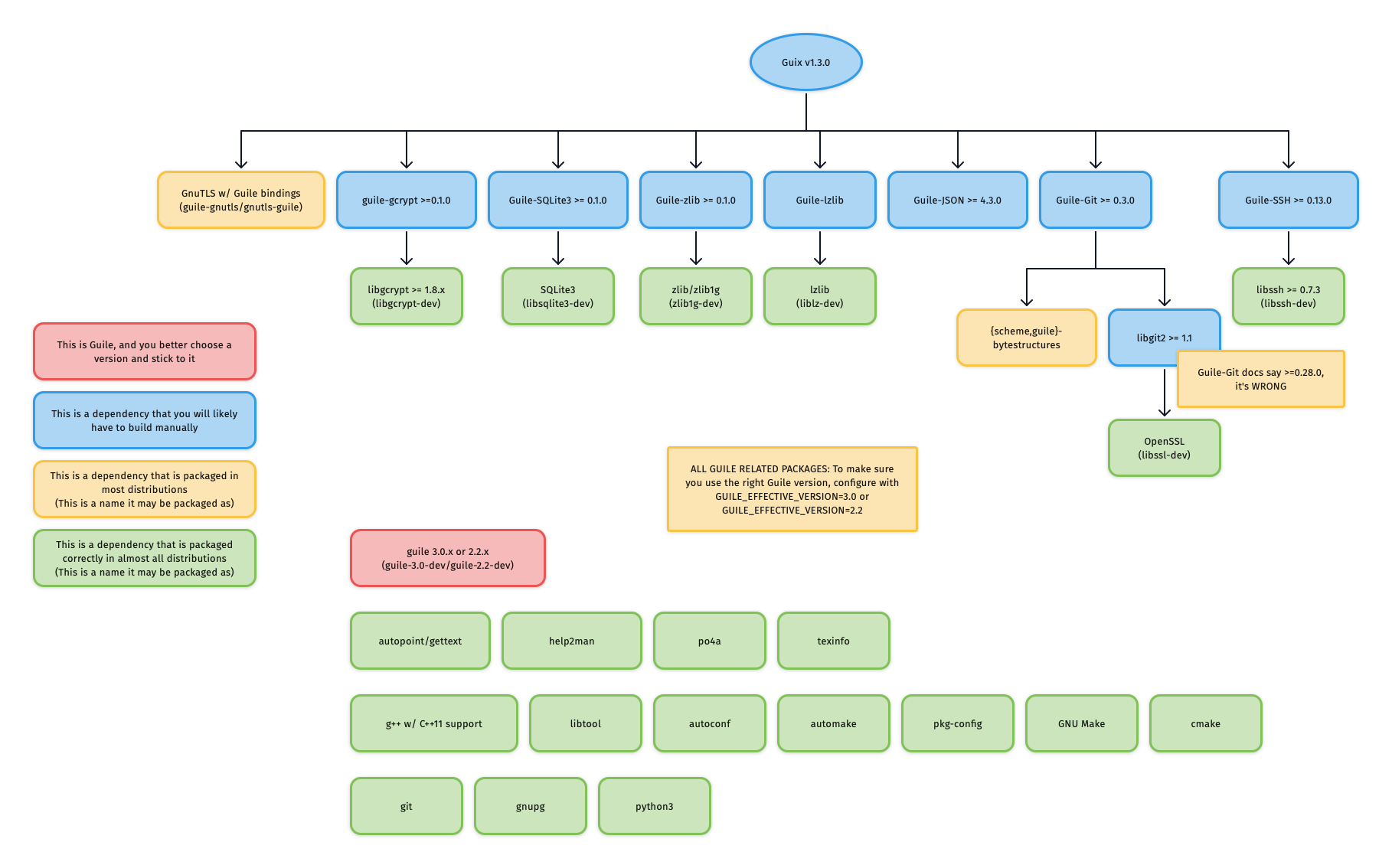155If you do not care about building each dependency from source, and Guix is156already packaged for your distribution, you can easily install only the build157dependencies of Guix. For example, to enable deb-src and install the Guix build158dependencies on Ubuntu/Debian:160```sh161sed -i 's|# deb-src|deb-src|g' /etc/apt/sources.list162apt update163apt-get build-dep -y guix164```166If this succeeded, you can likely skip to section167["Building and Installing Guix itself"](#building-and-installing-guix-itself).169#### Guile171###### Corner case: Multiple versions of Guile on one system173It is recommended to only install the required version of Guile, so that build systems do174not get confused about which Guile to use.176However, if you insist on having more versions of Guile installed on177your system, then you need to **consistently** specify178`GUILE_EFFECTIVE_VERSION=3.0` to all179`./configure` invocations for Guix and its dependencies.181##### Installing Guile183If your distribution splits packages into `-dev`-suffixed and184non-`-dev`-suffixed sub-packages (as is the case for Debian-derived185distributions), please make sure to install both. For example, to install Guile186v3.0 on Debian/Ubuntu:188```sh189apt install guile-3.0 guile-3.0-dev190```192#### Mixing distribution packages and source-built packages194At the time of writing, most distributions have _some_ of Guix's dependencies195packaged, but not all. This means that you may want to install the distribution196package for some dependencies, and manually build-from-source for others.198Distribution packages usually install to `/usr`, which is different from the199default `./configure` prefix of source-built packages: `/usr/local`.201This means that if you mix-and-match distribution packages and source-built202packages and do not specify exactly `--prefix=/usr` to `./configure` for203source-built packages, you will need to augment the `GUILE_LOAD_PATH` and204`GUILE_LOAD_COMPILED_PATH` environment variables so that Guile will look205under the right prefix and find your source-built packages.207For example, if you are using Guile v3.0, and have Guile packages in the208`/usr/local` prefix, either add the following lines to your `.profile` or209`.bash_profile` so that the environment variable is properly set for all future210shell logins, or paste the lines into a POSIX-style shell to temporarily modify211the environment variables of your current shell session.213```sh214# Help Guile v3.0.x find packages in /usr/local215export GUILE_LOAD_PATH="/usr/local/share/guile/site/3.0${GUILE_LOAD_PATH:+:}$GUILE_LOAD_PATH"216export GUILE_LOAD_COMPILED_PATH="/usr/local/lib/guile/3.0/site-ccache${GUILE_LOAD_COMPILED_PATH:+:}$GUILE_COMPILED_LOAD_PATH"217```219Note that these environment variables are used to check for packages during220`./configure`, so they should be set as soon as possible should you want to use221a prefix other than `/usr`.223#### Building and installing source-built packages225***IMPORTANT**: A few dependencies have non-obvious quirks/errata which are226documented in the sub-sections immediately below. Please read these sections227before proceeding to build and install these packages.*229Although you should always refer to the README or INSTALL files for the most230accurate information, most of these dependencies use autoconf-style build231systems (check if there's a `configure.ac` file), and will likely do the right232thing with the following:234Clone the repository and check out the latest release:235```sh236git clone <git-repo-of-dependency>/<dependency>.git237cd <dependency>238git tag -l # check for the latest release239git checkout <latest-release>240```242For autoconf-based build systems (if `./autogen.sh` or `configure.ac` exists at243the root of the repository):245```sh246./autogen.sh || autoreconf -vfi247./configure --prefix=<prefix>248make249sudo make install250```
Independent explanations by MyBitcoinExplorer. Not affiliated with or endorsed by Bitcoin Core. Guides are educational and do not replace the source or its tests.
Bitcoin Core source © its contributors, distributed under the MIT license. Original notices and bundled third-party licenses are retained in the source tree.